Every engineering leader evaluating AI coding assistants in 2026 eventually lands on the same shortlist, and the same argument. One camp wants GitHub Copilot because the whole team already lives inside GitHub. The other camp has a security officer in the room, and that person keeps asking a question Copilot cannot answer: can our source code stay entirely inside our own infrastructure?
That single question is what the Tabnine vs GitHub Copilot decision actually turns on. Not autocomplete quality. Not model benchmarks. Deployment control. The two products have drifted so far apart since Tabnine went enterprise-only in April 2025 that comparing them feature-by-feature misses the point. They are now built for different buyers.
Which is better for enterprise teams, Tabnine or GitHub Copilot? GitHub Copilot Business ($19/seat/month) is the better pick for most enterprise teams: cheaper, better models, native GitHub integration. Tabnine ($39–$59/user/month) wins only when compliance demands on-premises, VPC, or air-gapped deployment, because Copilot offers no self-hosted option at any price.
How we assess: this review is based on official documentation, pricing pages, changelogs, and verified user reports, not hands-on testing.
Key takeaways
- GitHub Copilot Business costs $19/seat/month; Tabnine’s cheapest plan is $39/user/month, billed annually only.
- Tabnine discontinued its free and individual plans on April 2, 2025, and is now a 100% enterprise product.
- Tabnine offers 4 deployment modes (SaaS, VPC, on-premises, air-gapped); Copilot offers exactly 1 (cloud).
- On G2, Copilot rates 4.5/5 across 347 reviews vs Tabnine’s 4.1/5 across 48, with a 2.4-point gap in ease of setup.
- Copilot Enterprise ($39/seat) costs the same as Tabnine Code Assistant, so at the top tier price stops being the differentiator.
- Copilot’s Free tier still gives individuals 2,000 completions/month; Tabnine has no entry point below a team contract.
What is the core difference between Tabnine and GitHub Copilot for enterprise teams?
Tabnine is a privacy-first AI coding platform you can run inside your own infrastructure, while GitHub Copilot is a cloud-only assistant with stronger models and deeper GitHub integration. That is the entire decision in one sentence, and everything else in this comparison is detail hanging off it.
Tabnine’s pitch to enterprise teams rests on where the code goes: nowhere. The company advertises zero code retention on all plans, no training on customer code, and deployment options that include fully air-gapped installs certified on Dell PowerEdge hardware with NVIDIA GPUs, according to AIUnpacking’s 2026 review. Its Protected 2 model is trained exclusively on permissively licensed code (MIT, Apache 2.0, BSD), with provenance checking that flags completions matching public repositories. For a bank, a defense contractor, or a hospital system, that stack of guarantees is the product.
GitHub Copilot’s pitch is different: it is the default. It ships with access to frontier models from OpenAI, Anthropic, and Google, it is wired into the GitHub platform your team probably already pays for, and Copilot Business includes centralized policy control and no code retention on business plans. What it will not do, at any price, is run inside your network. Microsoft has shown no sign of changing that in 2026.
So the “core difference” is not a feature gap either vendor will close. It is a philosophical split: Copilot assumes your code can touch Microsoft’s cloud; Tabnine assumes it cannot. Decide which assumption describes your organization and most of the work is done. Our full Tabnine review covers the platform’s history in more depth.
How much do Tabnine and GitHub Copilot cost per developer in 2026?
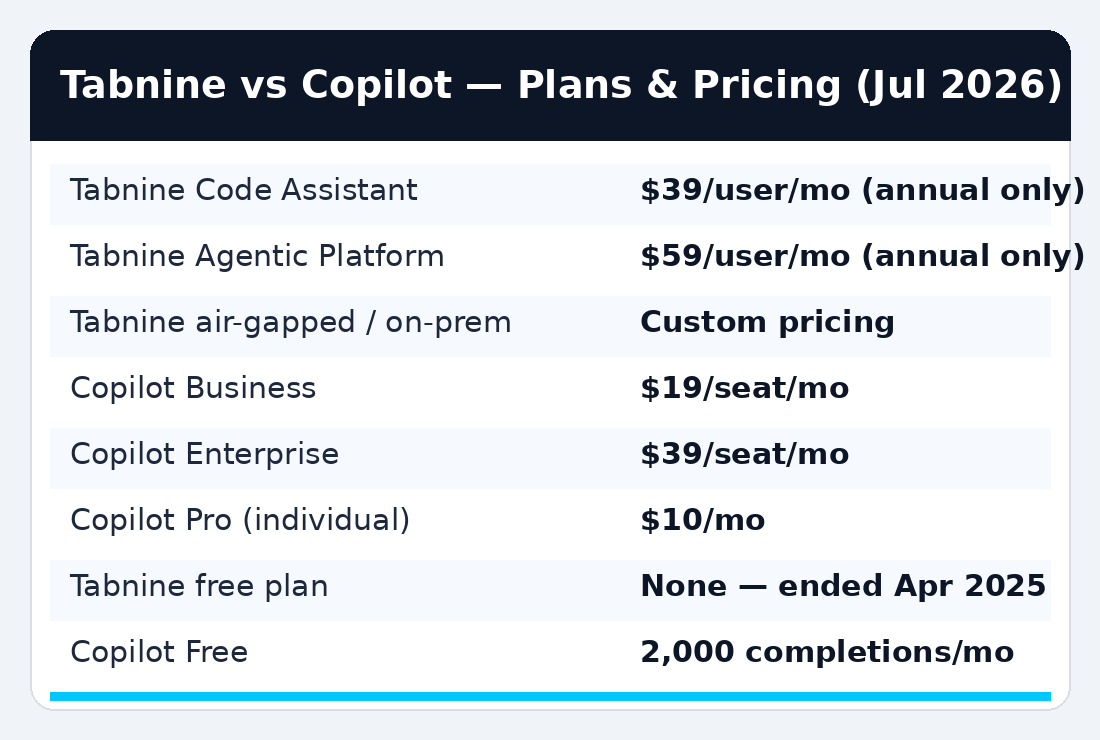
Tabnine costs $39/user/month (Code Assistant) or $59/user/month (Agentic Platform), both annual-only; GitHub Copilot Business costs $19/seat/month and Copilot Enterprise $39/seat/month, billed monthly per granted seat. For a 50-person team, that is a gap of at least $12,000 per year at the entry tiers.
Here is the full picture as of July 2026, taken directly from the Tabnine pricing page and GitHub’s official plans documentation:
- Tabnine Code Assistant — $39/user/month, annual subscription. Completions, IDE chat, Jira integration, SSO, governance controls, and the full deployment menu (SaaS, VPC, on-prem, air-gapped).
- Tabnine Agentic Platform — $59/user/month, annual. Adds autonomous agents, the Tabnine CLI, the Context Engine with unlimited codebase connections (GitHub, GitLab, Bitbucket, Perforce), and MCP tool support.
- Tabnine self-hosted/air-gapped — custom pricing. Expect a sales call.
- GitHub Copilot Business — $19/seat/month. Cloud agent, broad model catalog, monthly AI credit pool, centralized policy management.
- GitHub Copilot Enterprise — $39/seat/month. Everything in Business plus priority model access, a larger credit pool, codebase indexing, and custom model capabilities.
- Individual reference points — Copilot Pro is $10/month, Pro+ is $39, and the new Max tier is $100. Tabnine sells nothing to individuals anymore.
Two pricing traps deserve attention. First, Tabnine bills annually only, so a 100-seat Code Assistant contract is a $46,800 commitment up front, not a monthly experiment you can cancel. Second, Copilot’s credit-based premium request system means heavy agent users on Business can hit their monthly AI credit pool and need top-ups, which makes real-world Copilot spend less predictable than the sticker price suggests. Budget owners should model both.
Tabnine vs GitHub Copilot: enterprise comparison table
The table below condenses the decision to the five things procurement actually asks about. Prices verified against official pages on July 23, 2026.
| Tool | Price | Free plan | Best for | Key limit |
|---|---|---|---|---|
| Tabnine Code Assistant | $39/user/mo (annual only) | None (ended Apr 2, 2025) | Regulated teams needing private deployment | Completion quality trails Copilot on cross-file reasoning |
| Tabnine Agentic Platform | $59/user/mo (annual only) | None | Enterprises wanting agents inside their own infra | Agent maturity behind Copilot and Cursor |
| GitHub Copilot Business | $19/seat/mo | Copilot Free: 2,000 completions/mo (individuals) | Most enterprise teams on GitHub | Cloud-only; no on-prem or air-gapped option |
| GitHub Copilot Enterprise | $39/seat/mo | — | Large orgs wanting codebase indexing + custom models | Requires GitHub Enterprise Cloud |
Does Tabnine still have a free plan in 2026?
No. Tabnine has no free plan, no trial tier for individuals, and no monthly billing. The company discontinued its free Basic plan and its $9/month Dev plan on April 2, 2025, and completed its pivot to enterprise-only sales when the Enterprise Context Engine launched in March 2026.
This matters for enterprise buyers more than it first appears. The classic bottom-up adoption path, where a few developers use a free tier, like it, and lobby their manager, no longer exists for Tabnine. Every Tabnine evaluation now starts as a top-down procurement conversation with a sales team and an annual contract. Reddit threads from February 2026 document long-time Pro subscribers receiving cancellation notices, and the goodwill cost of that move still shows up in community sentiment.
Copilot took the opposite path. GitHub’s Free tier gives any developer 2,000 completions per month plus limited chat, per GitHub’s plans page, and students get Pro free. Your engineers have almost certainly already used it, which shortens rollout and training time to nearly zero. G2’s comparison data backs this up: Copilot scores 9.3/10 on ease of setup versus Tabnine’s 6.9, the single widest gap in the entire G2 head-to-head.
If your team wants to pilot before committing, Copilot lets you do it this afternoon. Tabnine makes you book a demo.
Which is better for privacy and compliance: Tabnine or GitHub Copilot?
Tabnine, and it is not close. Privacy is the reason Tabnine exists in its current form, while Copilot’s privacy story is solid for a cloud service but stops at the cloud boundary.
Tabnine’s compliance stack, as documented on its pricing page, includes zero code retention on all plans, no training on customer code, GDPR, SOC 2, and ISO 27001 compliance, and license-safe completions backed by Code Provenance checks. Its Protected 2 model was trained only on permissively licensed open-source code, which means a completion cannot surface GPL-contaminated snippets into your proprietary codebase without being flagged. For legal teams worried about copyright exposure in AI-generated code, that provenance layer is a concrete control, not a promise.
Copilot Business and Enterprise also exclude your prompts and code from model training, offer content exclusion rules for sensitive repositories, and add IP indemnification for paid business plans, meaning Microsoft assumes legal risk if Copilot output triggers a copyright claim and you kept the duplication filter on. That is a real protection, and for many general-purpose engineering orgs it is enough.
The gap opens at deployment. Every Copilot request transits Microsoft-controlled infrastructure. If your threat model, your regulator, or your government contract says source code may not leave your environment, Copilot is disqualified on page one of the security review, whatever its other merits. This is the same dynamic we found comparing legal AI platforms in our Harvey AI review: in regulated industries, deployment control beats model quality.

Can Tabnine or GitHub Copilot run on-premises or air-gapped?
Tabnine can; GitHub Copilot cannot. Tabnine supports four deployment modes: standard SaaS, VPC-hosted in your own cloud account, on-premises on Kubernetes, and fully air-gapped installations with no internet connectivity at all. Copilot runs exclusively as a cloud service.
The air-gapped option is Tabnine’s moat. AIUnpacking reports the configuration is certified on Dell PowerEdge servers with NVIDIA GPUs, which means a defense contractor or central bank can stand up AI code completion on hardware it physically owns, behind doors it physically locks. In that deployment, Tabnine runs its own proprietary models rather than frontier cloud models, and yes, completion quality takes a hit for it. The trade is explicit: you give up GPT-class reasoning to keep the code inside the building.
The VPC middle path deserves more attention than it gets. Teams that are cloud-comfortable but contractually barred from third-party AI processors can run Tabnine inside their own AWS or Azure account, keeping data residency and audit control without buying GPU racks. For a lot of mid-size fintechs, that is the actual sweet spot.
Copilot’s answer to all of this is organizational policy rather than physical isolation: content exclusions, audit logs, and enterprise policy controls administered from GitHub. Good tooling, but tooling that presumes trust in Microsoft’s cloud. There is no Copilot appliance, no self-hosted gateway, and GitHub has never announced plans for one. If “air-gapped” appears anywhere in your requirements document, this comparison has exactly one candidate left.
Which writes better code: Tabnine or GitHub Copilot?
GitHub Copilot produces better suggestions for most teams, mainly because it lets developers pick from frontier models like GPT-5, Claude Opus, and Gemini, while Tabnine’s private-deployment strength depends on proprietary models that trail on complex, cross-file reasoning.
The evidence lines up in one direction. The DEV Community 2026 comparison concludes Tabnine’s enterprise-tier proprietary models deliver “lower completion quality but stronger IP protection.” AIUnpacking’s review says completion accuracy “still trails Copilot and Cursor for complex cross-file reasoning.” On G2, Copilot leads Tabnine on “meets requirements” 8.7 to 7.1, which is the closest thing review data has to a quality verdict. And Copilot’s product velocity score (9.6 vs 7.8 for product direction) suggests the gap is widening, not closing.
Tabnine’s counterargument is context, not raw model IQ. Its Context Engine indexes unlimited repositories across GitHub, GitLab, Bitbucket, and Perforce, so suggestions can draw on your entire codebase, including the parts that never touch GitHub. For organizations with sprawling polyrepo estates on mixed Git platforms, that breadth is something Copilot Enterprise’s GitHub-only codebase indexing cannot match.
One caveat cuts the other way: when Tabnine runs in SaaS mode, it too can route to premium third-party models, narrowing the quality gap considerably. The quality penalty is really a private-deployment penalty. Teams comparing pure suggestion quality across the wider market should also read our Cursor vs GitHub Copilot vs Claude Code comparison, because Cursor and Claude Code have pushed past both products on agentic coding.
What admin, governance, and rollout controls do enterprise teams get?
Both platforms cover the enterprise-admin basics: SSO, centralized user management, usage analytics, and policy controls. The difference is texture. Copilot’s controls live inside GitHub’s existing org hierarchy, while Tabnine’s controls extend deeper into model governance.
Copilot Business lets enterprise owners assign seats to organizations, teams, or individual users, enforce policy from one console, and pull audit logs on higher tiers. If your identity and repo permissions already live in GitHub Enterprise, Copilot administration is close to zero-lift, which is exactly what that 9.3 ease-of-setup score on G2 reflects. Copilot Enterprise adds organization-wide knowledge bases and custom model options for orgs on GitHub Enterprise Cloud.
Tabnine’s governance layer is built for stricter regimes: per-team LLM access controls (decide which models which teams may use), scope and permission governance, centralized auditability, and per-user usage metrics. The LLM access control is the standout. A CISO can permit a frontier cloud model for the internal-tools team while restricting the payments team to the Protected 2 model, all in one deployment. Copilot has nothing equivalent at that granularity.
Rollout speed favors Copilot heavily. Tabnine’s 6.9 setup score reflects reality: standing up VPC or on-prem infrastructure, provisioning GPUs for air-gapped installs, and negotiating an annual contract takes weeks to months. A Copilot Business rollout to 200 developers can finish before lunch. Teams that want autonomous-agent workflows on top of governance should also weigh dedicated agent products; our Devin AI review covers what full autonomy currently buys you.
What does a 100-developer rollout actually cost per year?
A 100-seat GitHub Copilot Business deployment costs $22,800 per year at list price, while the same team on Tabnine Code Assistant costs $46,800, a difference of $24,000 annually before any add-ons or overages. At the top tiers, Copilot Enterprise and Tabnine Code Assistant both land at $46,800 for 100 seats.
Sticker math is only the start, though, and this is where the two vendors’ billing models diverge in practice. Copilot’s number can drift upward. Business seats include a monthly AI credit pool, and teams that lean hard on the cloud coding agent, code review, or premium models can exhaust it, triggering top-up purchases that finance never modeled. GitHub does not publish a simple per-seat overage table, which makes agent-heavy Copilot budgets genuinely hard to forecast a year out.
Tabnine’s number moves in bigger, lumpier steps. The $46,800 covers SaaS deployment. Choose VPC and you add your own cloud compute bill. Choose on-premises or air-gapped and you are buying GPU hardware (the certified reference is Dell PowerEdge with NVIDIA accelerators) plus the staff time to operate a Kubernetes deployment, against custom contract pricing that starts above the published tiers. A realistic all-in figure for a 100-developer air-gapped Tabnine install can run well past double the SaaS price once hardware amortization is included.
There is also a hidden line item on each side. For Copilot, it is churn risk in the credit system: developers who hit limits mid-sprint stop using the tool, and utilization reports quietly sink. For Tabnine, it is the annual-only commitment: a failed rollout cannot be cancelled in month three. Whichever you pick, negotiate a pilot cohort of 10–20 seats with defined success metrics before signing for the full hundred. Copilot makes that trivially easy; with Tabnine, ask sales directly, because the public pricing page will not offer it.
If you run a specific kind of team, here is your answer
Explicit mapping, no hedging:
- If you are a 20–200 person startup or scale-up on GitHub: get Copilot Business at $19/seat. The price, the models, and the zero-friction rollout make it the default for a reason.
- If you are a bank, insurer, healthcare system, or defense contractor: get Tabnine, VPC or air-gapped. Compliance disqualifies Copilot before quality ever gets discussed.
- If you are a large enterprise already on GitHub Enterprise Cloud: get Copilot Enterprise at $39/seat. Codebase indexing plus knowledge bases inside your existing platform beats introducing a second vendor at the same price.
- If your code lives across GitLab, Bitbucket, or Perforce: Tabnine. Copilot’s deep integration assumes GitHub; Tabnine’s Context Engine treats mixed estates as normal.
- If you are an individual developer or a 3-person team: neither vendor wants this comparison. Tabnine will not sell to you, and Copilot Pro at $10/month (or a tool from our Cursor review) is the actual market for you.
- If legal is worried about copyright in AI output: both have an answer, pick your flavor: Microsoft’s IP indemnification on paid Copilot plans, or Tabnine’s provenance-checked, permissively-licensed training corpus.
Tabnine: worth it if / skip it if
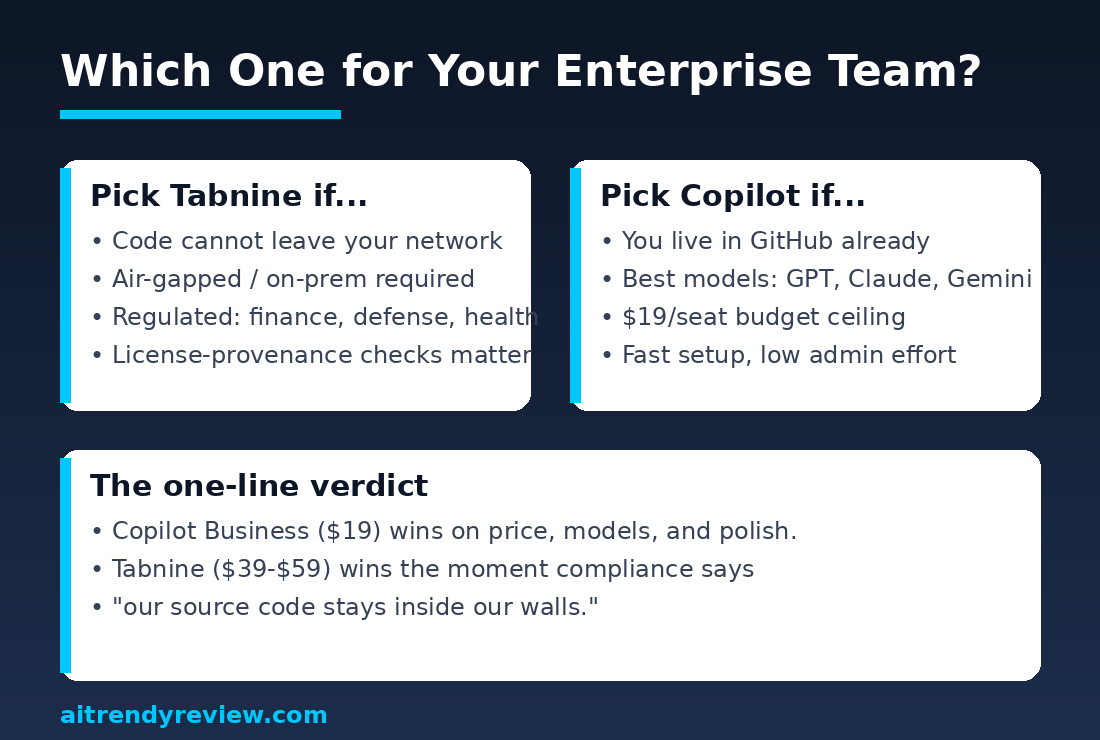
Worth it if your security or compliance function requires code to stay inside your infrastructure; you operate in finance, defense, healthcare, or government; you need per-team model governance; your repositories span GitLab, Bitbucket, or Perforce; or license provenance in AI completions is a legal requirement rather than a preference.
Skip it if you are price-sensitive at $39–$59 per user with annual lock-in; you want frontier-model completion quality as the primary criterion; you need monthly billing or a self-serve pilot; or your team is small, because Tabnine no longer sells below enterprise scale.
GitHub Copilot: worth it if / skip it if
Worth it if your organization is GitHub-native; you want the strongest model lineup (GPT, Claude, Gemini) under one $19 seat; you need to roll out to hundreds of developers this quarter; or IP indemnification from a trillion-dollar vendor satisfies your legal team’s copyright concerns.
Skip it if any regulation, contract, or threat model forbids source code transiting a third-party cloud; you need genuine on-premises or air-gapped operation; your estate is mostly non-GitHub; or unpredictable AI-credit consumption on agent-heavy teams would break your budgeting.
Frequently asked questions
Is Tabnine better than GitHub Copilot for enterprise use?
Tabnine is better only when private deployment is mandatory. It is the sole option offering VPC, on-premises, and air-gapped installs. For every other enterprise scenario, GitHub Copilot Business wins on price ($19 vs $39 per user), model quality, ease of setup, and G2 satisfaction scores (4.5 vs 4.1).
How much does GitHub Copilot cost for enterprise teams in 2026?
GitHub Copilot Business costs $19 per granted seat per month, and Copilot Enterprise costs $39 per seat per month, per GitHub’s official documentation as of July 2026. Both include a monthly pool of AI credits; heavy agent usage beyond the pool requires additional credit purchases, so real spend can exceed sticker price.
Does Tabnine have a free plan or trial in 2026?
No. Tabnine discontinued its free Basic plan and $9/month Dev plan on April 2, 2025, and now sells only annual enterprise subscriptions starting at $39/user/month. There is no self-serve trial; evaluations go through the sales team. GitHub Copilot’s Free tier (2,000 completions monthly) remains available to individuals.
Does GitHub Copilot train AI models on my company’s code?
No. On Copilot Business and Enterprise plans, GitHub states that prompts and code suggestions are not retained or used for model training. Administrators can add content exclusion rules to keep sensitive repositories away from Copilot entirely. Your code does, however, transit Microsoft’s cloud infrastructure during every request.
Which AI coding assistant works with GitLab, Bitbucket, and Perforce?
Tabnine. Its Context Engine connects to unlimited codebases across GitHub, GitLab, Bitbucket, and Perforce P4, feeding cross-repository context into completions and agents. GitHub Copilot integrates deeply with GitHub only; its Enterprise-tier codebase indexing requires GitHub Enterprise Cloud and does not index rival platforms.
Can GitHub Copilot run on-premises or air-gapped?
No. GitHub Copilot is cloud-only in 2026, with no self-hosted, VPC, or air-gapped option at any tier, and GitHub has announced no plans to add one. Organizations with strict data-residency or isolation requirements must use Tabnine, which certifies air-gapped deployments on Dell PowerEdge hardware with NVIDIA GPUs.
Does either tool protect against copyright claims in AI-generated code?
Both, differently. Microsoft offers IP indemnification on paid Copilot plans when the duplication filter is enabled, assuming legal defense of covered claims. Tabnine prevents the problem upstream: its Protected 2 model trains only on permissively licensed code, and Code Provenance checks flag completions matching public repositories.
Sources
Prices checked July 23, 2026.
- Tabnine official pricing page
- GitHub Docs: Copilot plans and pricing
- GitHub Copilot plans page
- G2: GitHub Copilot vs Tabnine comparison
- DEV Community: GitHub Copilot vs Tabnine, The Complete Comparison (2026)
- AIUnpacking: Tabnine Review 2026

Naveen Kumar Durai is the founder of Naveen AI Automation and the reviewer behind AITrendyReview. He builds AI automation systems daily and reviews AI tools from official docs, live pricing pages, and verified user reports — updated monthly as tools change.